Sorting
Server side sorting
Server side sorting should be preferred in almost all cases to client side sorting, since server side sorting is handled in the data layer making it very performant. Moreover, the fact that all the sorting logic is done in the data layer, all upper layers benefit from it. This way, modifying the sorting logic will automatically update all upper layers.
By default, all dynamic server side sorting is disabled since it's quite infrequent compared to static sorting, it's usually a very specific need in a business application and that it complicates the generated code. Enabling dynamic sorting can be done:
- At the project level with the Default Sortable property: setting it to true will enable dynamic sorting for properties of all entities,
- At the entity level with the Default Sortable property: setting it to true will enable dynamic sorting for all properties on the current entity,
- At the property level with the Sortable property: setting it to true will enable dynamic sorting on the current property.
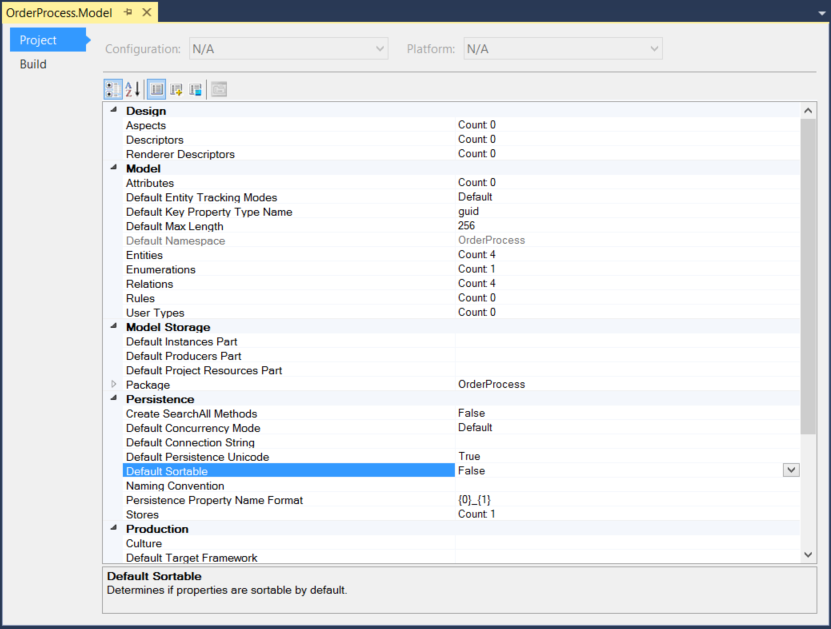
Technically when enabling dynamic sorting, it will change the generated stored procedure so that it uses an @_orderBy variable containing the name of the column to order by, and an @_orderByDirection indicating wether it should be ascending or descending. Then depending on the value stored in the variable, the returned collection will be ordered by a column or another.
Using this model:
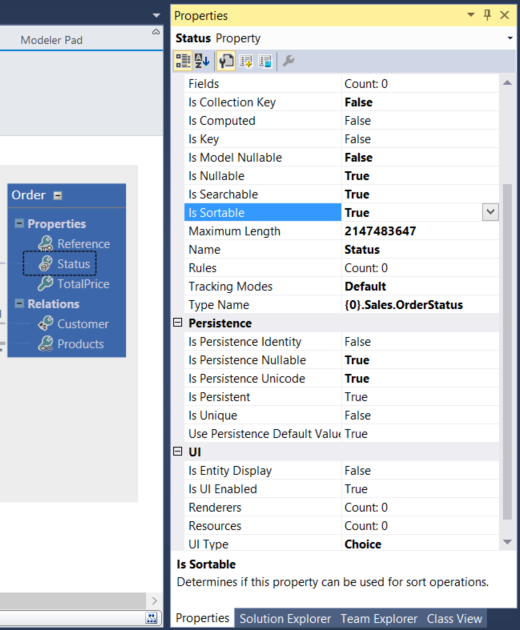
Will generate the following LoadAll stored procedure:
CREATE PROCEDURE [dbo].[Order_LoadAll]
(
 @_orderBy0 [nvarchar] (64) = NULL,
 @_orderByDirection0 [bit] = 0
)
AS
SET NOCOUNT ON
SELECT [Order].[Order_Reference], [Order].[Order_TotalPrice], [Order].[Order_Status], [Order].[Order_Customer_Id], [Order].[_trackLastWriteTime], [Order].[_trackCreationTime], [Order].[_trackLastWriteUser], [Order].[_trackCreationUser], [Order].[_rowVersion]
    FROM [Order]
    ORDER BY CASE
        WHEN @_orderBy0 = '[Order].[Status]' AND @_orderByDirection0 = 0 THEN [Order].[Order_Status]
    END ASC,
    CASE
        WHEN @_orderBy0 = '[Order].[Status]' AND @_orderByDirection0 = 1 THEN [Order].[Order_Status]
    END DESC

RETURN
GO
You can then use this in you C# code, from the generated BOM, like this:
static void Main(string[] args)
{
    OrderByArgumentCollection orderByArguments = new OrderByArgumentCollection();
    orderByArguments.Add("[Order].[Date]", System.ComponentModel.ListSortDirection.Ascending);

    PageOptions pageOptions = new PageOptions();
    pageOptions.OrderByArguments = orderByArguments;

    OrderCollection ordersSortedByDate = OrderCollection.PageLoadAll(int.MinValue, int.MaxValue, pageOptions);
}
Sorted Search
If entity contains sortable properties, those will be taken into account by the search method.
For instance the following declaration:
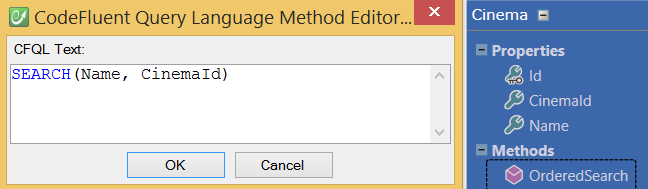
Will generate:
CREATE PROCEDURE [dbo].[Cinema_OrderedSearch]
(
 @Name [nvarchar] (256) = NULL,
 @CinemaId [nvarchar] (256) = NULL,
 @_orderBy0 [nvarchar] (64) = NULL,
 @_orderByDirection0 [bit] = 0
)
AS
SET NOCOUNT ON
DECLARE @sql nvarchar(max), @paramlist nvarchar(max)
SELECT @sql=
'SELECT [Cinema].[Cinema_Id], [Cinema].[Cinema_Name], [Cinema].[Cinema_CinemaId]
    FROM [Cinema]
    WHERE (1 = 1)'
SELECT @paramlist = '@Name nvarchar (256),
    @CinemaId nvarchar (256),
    @_orderBy0 nvarchar (64),
    @_orderByDirection0 bit'
IF @Name IS NOT NULL
    SELECT @sql = @sql + ' AND @Name = [Cinema].[Cinema_Name]'
IF @CinemaId IS NOT NULL
    SELECT @sql = @sql + ' AND @CinemaId = [Cinema].[Cinema_CinemaId]'
DECLARE @orderbyadded int
SELECT @orderbyadded = 0
IF @_orderBy0 = '[Cinema].[CinemaId]'
BEGIN
 IF @orderbyadded = 0
     SELECT @sql = @sql + ' ORDER BY '
 IF @orderbyadded > 0
     SELECT @sql = @sql + ', '
 SELECT @orderbyadded = @orderbyadded + 1
 SELECT @sql = @sql + '[Cinema].[Cinema_CinemaId] '
 IF @_orderByDirection0 = 1
     SELECT @sql = @sql + 'DESC '
 ELSE
     SELECT @sql = @sql + 'ASC '
END
IF @_orderBy0 = '[Cinema].[Name]'
BEGIN
 IF @orderbyadded = 0
     SELECT @sql = @sql + ' ORDER BY '
 IF @orderbyadded > 0
     SELECT @sql = @sql + ', '
 SELECT @orderbyadded = @orderbyadded + 1
 SELECT @sql = @sql + '[Cinema].[Cinema_Name] '
 IF @_orderByDirection0 = 1
     SELECT @sql = @sql + 'DESC '
 ELSE
     SELECT @sql = @sql + 'ASC '
END
IF @_orderBy0 = '[Cinema].[Id]'
BEGIN
 IF @orderbyadded = 0
     SELECT @sql = @sql + ' ORDER BY '
 IF @orderbyadded > 0
     SELECT @sql = @sql + ', '
 SELECT @orderbyadded = @orderbyadded + 1
 SELECT @sql = @sql + '[Cinema].[Cinema_Id] '
 IF @_orderByDirection0 = 1
     SELECT @sql = @sql + 'DESC '
 ELSE
     SELECT @sql = @sql + 'ASC '
END
EXEC sp_executesql @sql, @paramlist,
    @Name,
    @CinemaId,
    @_orderBy0,
    @_orderByDirection0
RETURN
GO
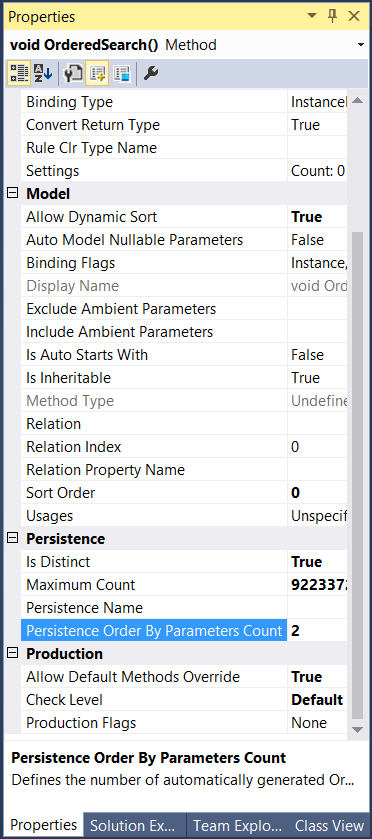
If you need to be able to sort by more than one column at a time, you can control the number of 'order by columns' using the Persistence Order By Parameters Count property.